

BI Governance Framework: Where to Start for Tableau and Power BI Teams
Someone in finance asks which revenue dashboard is the right one. There are four candidates, three of the owners have moved teams, and a fifth copy sits on a personal workspace. Nobody can say which is authoritative, and nobody is sure deleting any of them is safe.
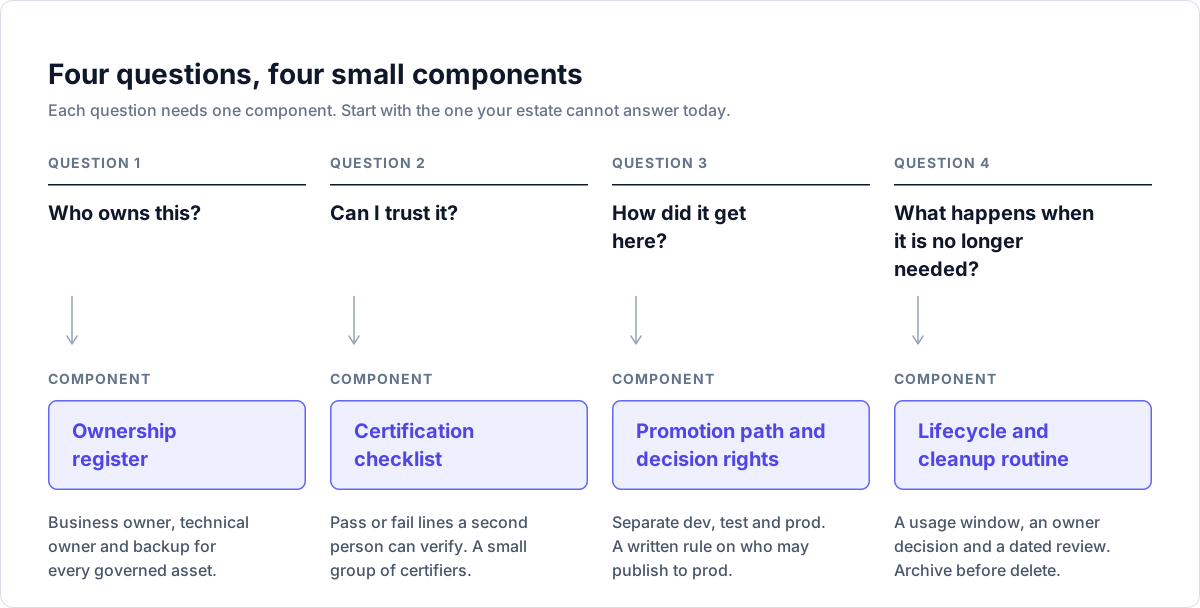
Governance exists to make that situation rare, and it is a smaller job than most programs make it. I reduce it to four questions: who owns this, can I trust it, how did it get here, and what happens when it is no longer needed. Each needs one small component, and you can build all four in a month with a spreadsheet and a calendar.
For why the underlying metadata matters, see what is metadata management for BI teams. For checking what a change will break, see Tableau impact analysis explained.
Decide how much control each kind of content gets
Do not govern everything equally. Microsoft’s Fabric adoption roadmap says the level of oversight depends on who owns the content, how widely it is delivered, how sensitive the data is, and whether decisions depend on it. Tableau’s Blueprint describes three governance models (centralized, delegated, self-governing), says they can be mixed, and suggests reviewing them twice a year.
I start with two tiers.
| Tier | What it covers | What it gets |
|---|---|---|
| Governed | Shared data sources and models, and any dashboard that executives, auditors or customers see | Named owners, certification, controlled publishing, scheduled review |
| Everything else | Personal and team analysis, prototypes | A sandbox, a visible “uncertified” label, and the cleanup routine |
You will see how big the first tier is when you build the register. Cap it at the 20 most used dashboards plus the shared sources and models behind them.
1. Ownership: one register, three names per asset
Ownership has to be a person who will still be there in a year. Microsoft’s roadmap separates data steward, subject matter expert, technical owner and domain owner. That is four roles too many for a first pass, so I use three columns:
- Business owner. Decides what the number means and who may use it. Answers when it is wrong.
- Technical owner. Builds it, publishes it, fixes it, handles a failed refresh.
- Backup. Can act for the technical owner. Microsoft’s guidance says to include backup personnel when assigning roles.
Start with shared data sources and shared semantic models, then the top 20 dashboards. A certified dashboard on an unowned data source is not trustworthy. Download the ownership register template (CSV). It has one row per asset, with owner, backup, certification status, next review, last used and a disposition. The three example rows are fake.
Set the owner on the platform too. Power BI items have a contact list, and Microsoft suggests two to four workspace admins, audited perhaps twice a year. In Tableau, ownership sits in the project structure and permissions. A consumer should be able to find the owner without asking the BI team.
2. Trust: write the checklist before you issue the badge
Both platforms can mark content as trusted, and a badge is only as meaningful as the standard behind it.
Power BI and Fabric. Anyone with write permission on an item can mark it Promoted. Certified is stricter: only people in security groups a Fabric admin has authorized can apply it, and an admin must enable it first (Microsoft Learn, enable item certification). The admin lists the groups (groups only, not named users) and can add a link to your certification policy, which is where the checklist below belongs. Certification setup can be delegated to domain admins. All Fabric items except Power BI dashboards can be certified.
Tableau. Certification applies to data sources, and with a Data Management license, to virtual connections and some catalog assets. Server and Site Administrators can certify. So can Explorer (Can Publish) and Creator users who own the project or have the Project Leader capability on it (Tableau Help, certify data sources). Tableau recommends documenting your certification guidelines. Workbooks have no badge. In Tableau’s Blueprint, authors publish to a sandbox project, a Site Administrator or Project Leader validates and approves, and the content then moves to a production project that a small group can publish to (Tableau Blueprint, governance in Tableau).
So plan for a difference. In Power BI the badge is the signal. For Tableau workbooks the production project is the signal, with the data source badge underneath. The checklist treats both the same.
The checklist
The certification checklist (markdown) is built to paste into a ticket. Every line has a PASS condition a second person can verify. It has seven sections:
- Ownership. Register row exists, three named people, each confirmed in writing, contact set on the asset.
- Source and access. Source of record named, data owner approved the use, team-owned credentials, group-based access, row level security tested as a user from each restricted group.
- Calculations. Each headline metric has a definition card, calculations reviewed by someone other than the author, hard-coded values documented.
- Reconciliation. Headline numbers compared with a source of truth for named periods, within a tolerance agreed before testing.
- Refresh and performance. Schedule matches the freshness the business needs, failures notify a shared channel, load time meets a target set in advance.
- Release and location. In production, published through the agreed path, no duplicate.
- Review date. A future date in the register and on the asset.
Two rules make it hold. Write the reconciliation tolerance before the test, so a failure cannot be argued into a pass. And the certifier is never the author; Blueprint has the author validate first, then the data steward and the Site Administrator or Project Leader. Keep the certifying group small, so the badge means one thing.
Metric definitions
“Which number is right” erodes trust faster than any outage. The causes are mundane: one label calculated two ways, a definition changed in one report and not the others, and nobody with authority to pick a winner. Write one card for each of your ten most quoted metrics: name, plain-language definition, formula, owner, source of record, grain, known exclusions, where the calculation lives, last reviewed. The metric definition card template includes a worked example (an invented “Active customers”, not a recommended definition).
The field that matters most is where the calculation lives. If the measure sits in one shared model and reports reference it, two dashboards disagreeing is a defect in one of them. If every report recalculates it, you get a meeting.
3. Promotion: how content reaches production
Most surprises come from someone editing live content. The control is separation: a development place, a test place and a production place, with a written rule on who may publish to production and what must be true first.
In Power BI, deployment pipelines do this. A pipeline has two to 10 stages, with development, test and production as the default three (Microsoft Learn, deployment pipelines). One trap on that page: items are paired between stages, and unpaired items with identical names are not overwritten, they are duplicated. Check pairing before assuming a deployment replaced something. Microsoft’s lifecycle guidance also says deployment pipelines need Fabric or Premium capacity or Premium Per User licenses, so confirm what you have first.
In Tableau, it is project structure: a sandbox project for ad hoc work, a production project for validated content, publishing to production limited to Project Owners and Project Leaders, and permissions set at project level with locked projects and groups. Moving content can be done by hand, with the Content Migration Tool (licensed as part of Tableau Advanced Management), or with REST API scripts. Blueprint advises against copying a heavy dev, QA and production waterfall onto an analytics platform, because users route around slow approvals.
On either platform, write the rule in three lines: who may publish to production, what must be true first (the checklist, a reviewer, a release note), and how a change to a certified shared model is announced.
4. Lifecycle: review is a scheduled step with a decision at the end
Content only accumulates unless someone is responsible for removing it. Microsoft’s guidance says retiring content reduces clutter, reduces confusion about what to use, and makes security audits easier (Microsoft Learn, retire and archive content).
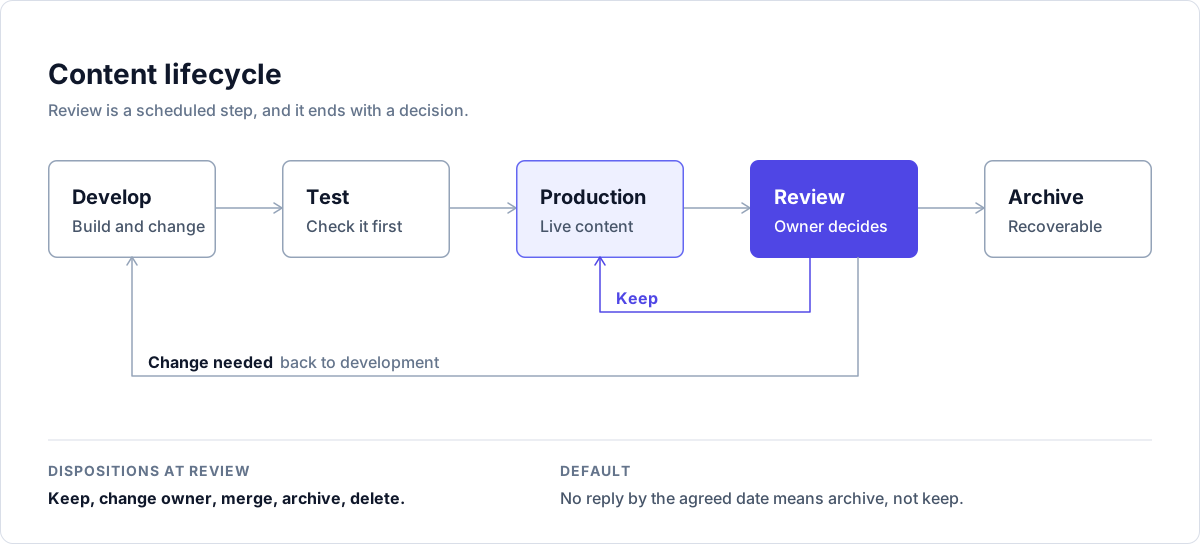
Pick a time window per kind of content. Microsoft’s examples run from one month for a daily operational report to a year for a model built once a year for external auditors, and some content is exempt from low-usage rules entirely. One 90 day rule would archive the auditor’s model.
Look at more than views. Microsoft suggests views, queries on semantic models, viewers (excluding creators and support staff), refresh dates and last update dates, and reading any documentation before deciding. Its admin API for unused Power BI items looks back only 30 days, too short for most retirement decisions, and the user activity history is available for 28 or 90 days depending on source. Start storing activity data now.
In Tableau, use the Stale Content admin view. You set a Stale Access Threshold from 1 to 120 days, see the disk space stale content uses, and since 2020.3 can tag stale content, up to 1,000 objects at a time (Tableau Help, Stale Content). Blueprint’s resource management page says stale content should be removed two to four times per year, and that page states it applies to Tableau Server only, so confirm what your Tableau Cloud site offers. The 120 days is the view’s ceiling, not a recommendation. Choose a window and write it down.
Archive before you delete, and keep a change log. Microsoft’s retirement checklist: confirm scope, check lineage and dependencies, archive to a restricted location, test the recovery plan, tell the owner, record what was deleted, when, why and by whom. Check your tenant’s workspace retention setting so you know how long a deleted workspace can be restored.
The register uses five dispositions: keep, change owner, merge, archive, delete. This list is my own, not a vendor’s. The owner picks one at each review. If the owner does not reply within a period you set in advance, the default is archive, not keep. With a default of keep, nothing ever leaves.
Who decides what
Microsoft’s roadmap quotes the Data Governance Institute: governance is “a system of decision rights and accountabilities”. A one-page version is a RACI table. R does the work, A answers for it (one person), C is consulted, I is informed. Rename the roles to what you have.
| Decision | Content creator | Technical owner | Business owner | Certifier | Platform admin | Governance lead |
|---|---|---|---|---|---|---|
| Publish a new report to production | R | A | C | I | I | |
| Certify an asset | C | C | C | A, R | I | I |
| Change a certified shared model (non-breaking) | A, R | C | I | |||
| Change a shared model in a breaking way | C | R | A | C | I | I |
| Approve a metric definition change | C | A | C | R | ||
| Archive or delete an asset | R | A | I | R | I | |
| Hand ownership to a new person | R | A | I | I | I | |
| Revoke certification | C | I | A, R | I | I | |
| Change tenant or site settings that affect governance | C | C | A, R | C |
Three rules sit behind it. One accountable person per decision; two As means nobody is. The business owner answers for meaning and use, the technical owner for how it is built and run, and neither decides the other’s half. And Microsoft’s guidance says decisions that affect what users can and cannot do should not be made solely by a system administrator, so admins hold the keys but the rules belong to the governance lead and the owners.
First meeting (60 minutes)
Invite the BI lead, two or three technical owners, two business owners of heavily used assets, a platform admin, and someone from audit or risk if you have one.
- One real example (5 minutes). Two dashboards disagreeing, or an orphaned asset. Name no one.
- Scope (10). Agree the governed tier, capped at the top 20 by usage to start.
- Roles (10). Business owner, technical owner, backup. Name the governance lead and the certifiers.
- Register (10). Assign who fills which rows, by what date.
- Checklist (10). Read it aloud. Change lines you cannot test in your environment. Agree how reconciliation tolerance gets set.
- Cleanup rule (10). Usage windows by content type, a default disposition, a date for the first review.
- Actions (5). One owner and one date each.
Send the agreed register and checklist as the minutes.
A 30 day plan
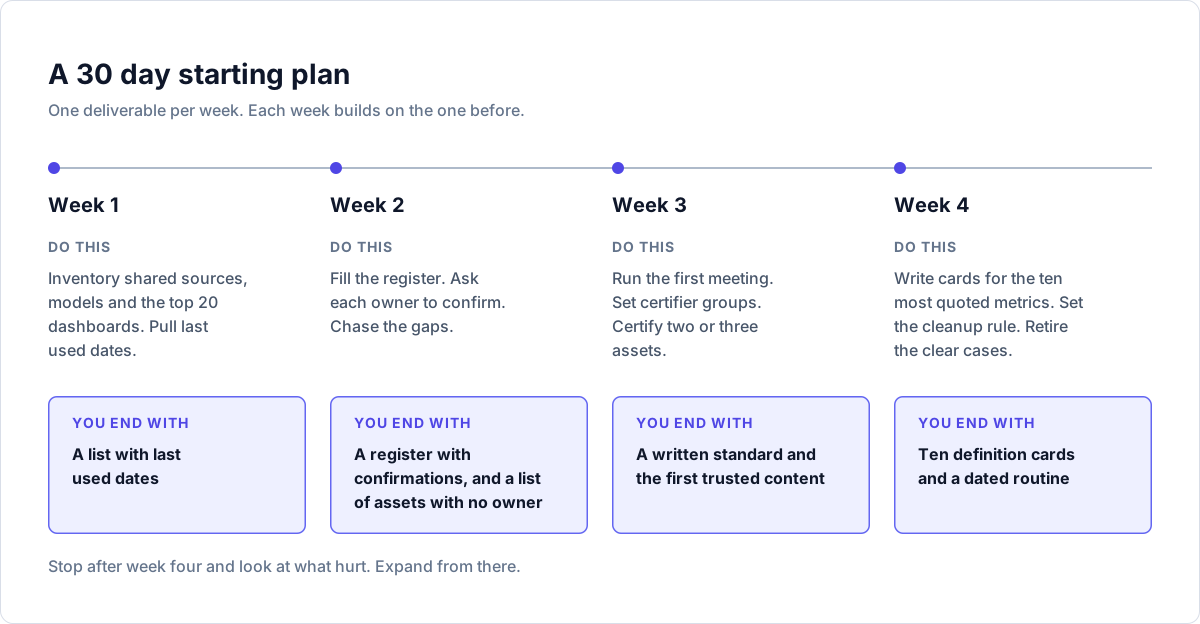
| Week | Do this | You end with |
|---|---|---|
| 1 | Inventory shared sources, models and the top 20 dashboards. Pull last used dates (Power BI activity data or admin APIs, Tableau admin views including Stale Content). | A list with last used dates |
| 2 | Fill the register. Send each owner a note asking them to confirm. Chase the gaps. | A register with confirmations, and a list of assets with no owner |
| 3 | Run the first meeting. Ask the platform admin to set certifier groups (Power BI) or confirm project leaders (Tableau). Certify two or three assets. | A written standard and the first trusted content |
| 4 | Write cards for the ten most quoted metrics. Set the cleanup rule and put the first review on the calendar. Retire the clear cases (no owner, no use). | Ten definition cards and a dated routine |
Stop after week four and look at what hurt. Expand from there.
A team of two will be both technical owner and certifier, which breaks the author-is-not-the-certifier rule. Swap: each certifies the other’s assets, and the business owner does the reconciliation because they know what the number should be. Keep one register and one production project or workspace. The decision rights can be three lines in a wiki. At this size the risk is losing a key person, so the backup column matters most.
An enterprise has a distance problem. Owners sit in business units that have never heard of you, so you need a governance lead with authority, a small certifier group and usually delegation. Blueprint describes delegated governance, with Site Administrators and Data Stewards outside IT, and Microsoft’s roadmap describes delegating certification to domains. Put extra criteria (security review, regulatory sign-off) in the checklist as tier-specific lines, and make governance a standing item in an existing forum rather than a new committee.
When analysts see governance as a blocker
They are partly right. Microsoft’s roadmap says governance is not well received when enacted through top-down mandates that favor control over empowerment, and that the answer to a request should be “yes, and” with clear, simple rules rather than “no” by default. What I would say, plainly:
- The sandbox stays free. Rules apply to the production tier. Exploration stays where it is, with an “uncertified” label.
- Certified work gets found. Tableau says certified data sources rank higher in search and recommendations, and Power BI endorsed items are given precedence in some lists.
- Your name and your backup’s go on the asset. When you change teams, nobody chases you about a dashboard you built three years ago.
- Tell us which checklist line is wrong. If a line has no value in your case, we change it for everyone.
Then do the typing for them: pre-fill the register from the platform inventory so the analyst confirms instead of entering.
Where Rapid Lens fits
Everything above works with a spreadsheet and the admin views each platform already provides. What gets slow at scale is visibility: building the inventory, seeing what depends on what before you archive or change a shared model, and keeping documentation current as certification evidence.
Rapid BI Catalog gives you a searchable inventory of Tableau and Power BI content with lineage and impact analysis down to the field level, so seeding the register and checking dependencies before a retirement take less time. RapidDox for Tableau and RapidDox for Power BI generate documentation for individual workbooks, data sources and .pbix files, which can be attached to a certification ticket. Both work on metadata only. They do not replace the badge or the rules in your platform, and they do not decide ownership. The standards are yours to set, with or without our software.
Written by Natraj, Founder, RapidDox & Rapid Lens. 25 years of experience in data and business intelligence.