With Rapid BI Catalog, you can ingest Tableau and Power BI metadata into your chosen database. This enables comprehensive analysis of the effects and influences of upstream changes, and powers Metadata Insights, Lineage, and Impact Analysis.
Database User Prerequisites
The database user configured here must have privileges to create databases, tables, and execute INSERT, UPDATE, and DELETE operations. The configuration process will automatically create a database named
bicatalogdb and the necessary tables within it.Supported Databases
| Database |
|---|
| MySQL |
| Microsoft SQL Server |
| PostgreSQL |
Licence Required
Microsoft SQL Server is available on all plans. MySQL and PostgreSQL require the Professional or Enterprise plan. See License Management.
Security
The password provided during configuration is encrypted and stored in an encoded manner on your local system.
TLS / Connection Security
TLS is required for all networked database connections (MySQL, PostgreSQL, and SQL Server). When you configure a database, choose a TLS mode:
| Mode | What it does |
|---|---|
| Verify (recommended) | Validates the database server's certificate against a CA certificate (PEM) you supply. The secure, recommended option. |
| Trust all | Encrypts the connection but does not validate the server certificate. Requires an explicit acknowledgement that the server is on a trusted network. |
Prefer "Verify" with a CA certificate
Use Trust all only on a trusted intranet where you cannot supply a CA certificate — it disables certificate validation.
Configure via UI
- Go to the Rapid BI Catalog webpage.
- Go to the Database Configuration tab from the left panel.
- Fill out the database configuration information and click Submit.
Host Format
Make sure to include the port in DB Host, e.g.
<host-ip>:<port>.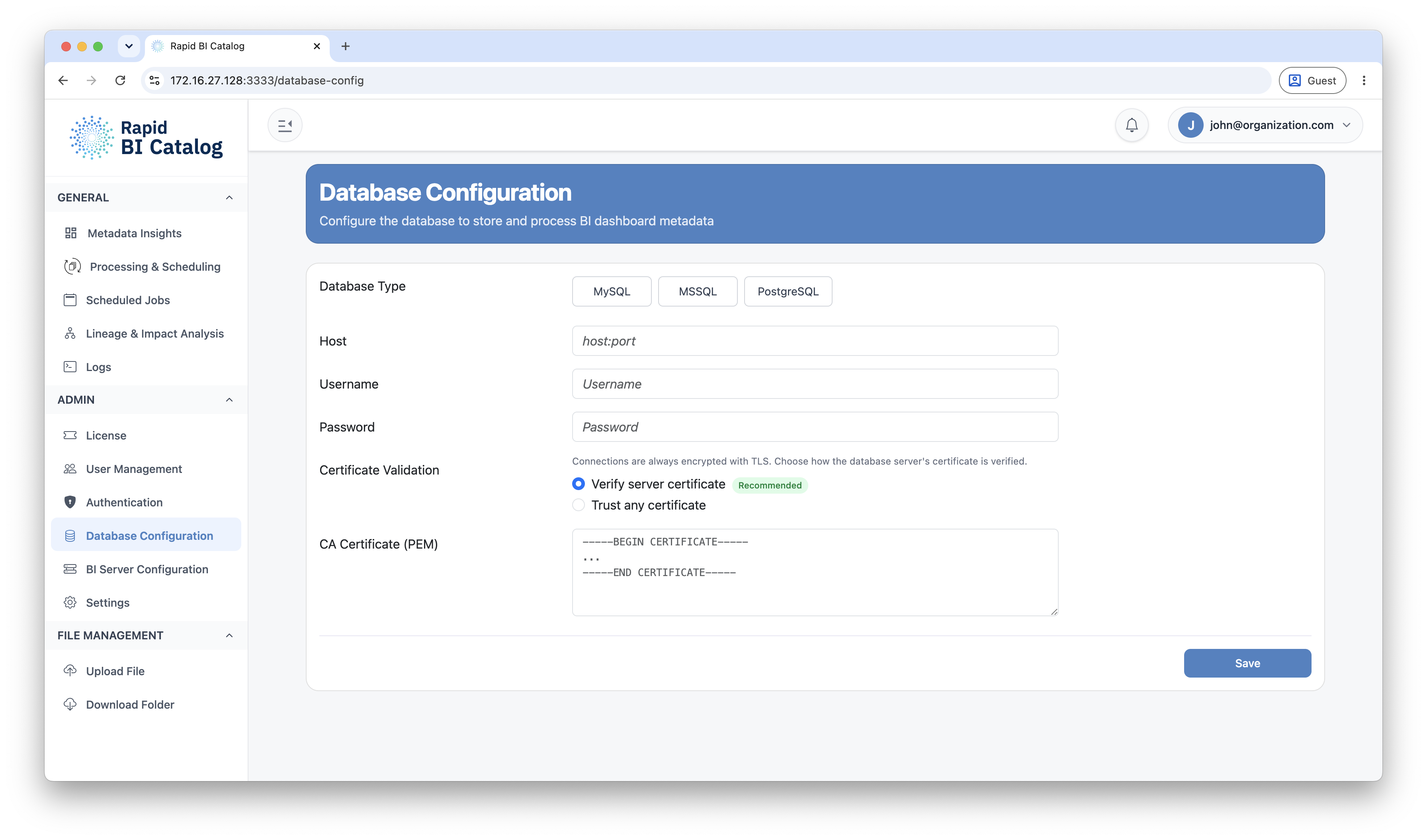
Changing the Metadata Export Database
The system supports one active database configuration at a time. To switch to a different database:
- Delete the existing database configuration.
- Configure the new target database.
Data Retention
Deleting a configuration only removes the connection settings. It does not delete any metadata previously exported to the older database.
Next Steps
- Connect Tableau or Power BI: BI Server Configuration
- Run your first export: Processing & Scheduling